Elasticsearch Storage Optimization: ILM, Mapping, pattern_text
Elasticsearch Storage Optimization: ILM, Mapping, and pattern_text
Storage bloat is the silent cluster killer. Most Elasticsearch clusters start lean and grow expensive, not because data volume is unavoidable, but because defaults compound. Dynamic mappings create double the inverted index overhead. Every shard you over-provision consumes JVM heap. Indices that should have rolled to frozen tier six months ago are still sitting on SSDs. The combination of mapping discipline, codec selection, ILM/SLM lifecycle automation, data tiering, and the new pattern_text field type can reduce active storage by 65–95% compared to an unoptimized cluster — with no loss of query capability on production workloads (Elastic docs, BusinessWire, Dec 2024).
For background on ingestion pipelines and data stream setup, see Getting Data into Elasticsearch.
TL;DR — Elasticsearch storage bloat comes from three sources: uncontrolled dynamic mappings, oversized hot-tier shards, and missing ILM lifecycle policies. Disciplined mapping templates, LogsDB with
pattern_text, and full hot-warm-cold-frozen tiering reduce active storage by 65–95% with no loss of query capability.
Key Takeaways
- Dynamic string mappings create both
textandkeywordsub-fields by default — double the inverted index storage with no benefit if you only need one (Elastic disk usage guide).- Shard sizing target: 10–50 GB per shard, max 200 million documents. Over-sharding is consistently the most expensive mistake on large clusters (Elastic shard sizing).
- The frozen tier uses partially mounted searchable snapshots — up to 20x storage reduction vs warm tier with replicas (Elastic data tiers).
- LogsDB index mode cuts storage by up to 65% vs standard indexing. The new
pattern_textfield (GA in 9.3) adds a further ~50% reduction onmessagefield storage specifically (BusinessWire, Dec 2024).- ILM
min_ageis relative to rollover time, not index creation time. Most engineers misconfigure this and pay for it in unexpected warm-phase delays.- Always pair ILM delete with SLM
wait_for_snapshot. Deleting an index without a confirmed snapshot is unrecoverable.
How Does Mapping Discipline Reduce Storage?
Undisciplined dynamic mappings are often the largest single storage cost in a growing cluster. By default, Elasticsearch maps every string field to both a text type (for full-text search) and a keyword sub-field (for aggregations and sorting) — two inverted index structures where you usually need only one (Elastic disk usage guide). On a log pipeline ingesting 100 unique string fields per event, that means 200 index structures per field, compounding with document count.
The default field limit is 1,000, controlled by index.mapping.total_fields.limit. Some teams raise this to 10,000 or higher when they encounter mapper_parsing_exception errors. That is the wrong response. A cluster with 50,000 mapped fields will exhibit JVM heap pressure, slow searches, and put-mapping task backlogs — all of which the Elastic troubleshooting guide classifies as mapping explosion (Elastic mapping explosion guide).
Mapping explosion is almost always an upstream schema problem, not an Elasticsearch problem. The root cause is typically uncontrolled key generation in application logs — JSON objects where key names include user IDs, request IDs, or timestamps. The fix belongs in the application or ingest pipeline, not in the field limit setting. Raising total_fields.limit buys time; it does not fix the architecture.
For pipeline-level field transformation to prevent mapping explosion at the source, see Getting Data into Elasticsearch.
The triage option is index.mapping.total_fields.ignore_dynamic_beyond_limit: true. This silently drops new fields beyond the limit instead of rejecting the document. It is safe for production if you accept that overflow fields are not indexed. It is not a permanent fix. The permanent fix is a reindex with a corrected mapping. You cannot reduce mapped field count in place — the mapping is append-only once initialized.
For indices with arbitrary or unpredictable key structures (dynamic alert metadata, Kubernetes labels, cloud provider tags), use the flattened field type. It stores the entire object under a single field in a compressed representation, preventing field count explosion while retaining keyword search capability on leaf values.
Use a dynamic template to enforce keyword-only mapping on string fields that do not need full-text scoring:
PUT _index_template/logs-strict
{
  "index_patterns": ["logs-*"],
  "template": {
    "settings": {
      "index.mapping.total_fields.limit": 1000,
      "index.mapping.total_fields.ignore_dynamic_beyond_limit": true
    },
    "mappings": {
      "dynamic_templates": [
        {
          "strings_as_keyword": {
            "match_mapping_type": "string",
            "mapping": {
              "type": "keyword",
              "ignore_above": 256
            }
          }
        }
      ]
    }
  }
}
This template eliminates the default text+keyword double-mapping on every string field. For fields you actually need to run full-text queries against (log message bodies, for example), override explicitly to match_only_text.
What Is the Right Shard Architecture?
The shard sizing target is 10–50 GB per shard with a ceiling of 200 million documents per shard (Elastic shard sizing docs). Violating either bound costs you: oversized shards cause recovery time spikes and slow segment merges; undersized shards multiply JVM overhead and routing complexity. One shard per gigabyte is a common mistake that produces thousands of shards on large clusters.
The correct approach for time-series data is ILM rollover with explicit size and document count bounds. Configure max_primary_shard_size: 50gb in your rollover action. Pair it with max_docs: 200000000 to catch document-dense indices that stay small in bytes. Either condition triggers rollover, whichever fires first.
After rollover, the index enters the warm phase as read-only. This is the right moment to apply the Shrink API, reducing shard count to match the lower read throughput requirements of historical data. A hot-phase index with 5 primary shards might shrink to 1 in warm. Each primary shard you eliminate removes both the shard and its replica from cluster state.
Audit current allocation before making any shard changes:
GET /_cat/allocation?v&s=disk.used:desc
This surfaces nodes sorted by disk usage, showing shard count alongside bytes used and remaining. Run this before any ILM policy change to establish a baseline and spot nodes that are already near disk watermarks.
I've seen a single 200 GB shard reallocation hold a cluster at yellow for 20+ minutes on an already-loaded fleet. The 10–50 GB guideline looks conservative until that happens. Keeping shards below 50 GB is operational insurance, not just a performance guideline. If your cluster health monitoring is alerting on frequent yellow states, oversized shards are a likely contributor.
Compression: Codecs, Field Types, and forcemerge
index.codec: best_compression is an underused setting. It applies DEFLATE compression to _source and stored fields, with minimal CPU overhead on read paths and meaningful storage savings on compressible data like JSON logs (Elastic disk usage guide). The default codec (LZ4) is faster but less space-efficient. For warm and cold indices that are read infrequently, the tradeoff is obvious.
For log message fields, replace text with match_only_text. The match_only_text type drops positional index data and BM25 scoring, which are not used for log search. It retains full-text match capability. The storage reduction is significant because positional data scales with document count — on a high-cardinality log stream, it can exceed the size of the source content itself.
Force merge is the highest-impact single action for read-only indices. Running forcemerge with max_num_segments=1 collapses all Lucene segments into one, reclaims soft-deleted document tombstones, and improves block-level compression. It also enables the index sorting optimization to take full effect. Only run forcemerge on read-only indices. On write-active indices, forcing a single segment blocks ingestion and produces segments larger than 5 GB, which cannot be merged further by normal background merging.
Index sorting improves compression ratios by co-locating documents with similar field values in adjacent Lucene blocks. Sort by the highest-cardinality field that has repetitive values (for example, service.name or log.level on a log index). Combine with best_compression for maximum effect.
Here is an index template that applies all of these compression settings:
PUT _index_template/logs-compressed
{
  "index_patterns": ["logs-*"],
  "template": {
    "settings": {
      "index.codec": "best_compression",
      "index.sort.field": ["service.name", "@timestamp"],
      "index.sort.order": ["asc", "desc"],
      "index.mapping.total_fields.limit": 1000
    },
    "mappings": {
      "dynamic_templates": [
        {
          "strings_as_keyword": {
            "match_mapping_type": "string",
            "mapping": {
              "type": "keyword",
              "ignore_above": 256
            }
          }
        }
      ],
      "properties": {
        "message": {
          "type": "match_only_text"
        }
      }
    }
  }
}
ILM and SLM: The Right Policy Design
ILM has five phases: hot, warm, cold, frozen, and delete. The hot phase handles rollover, forcemerge, and shrink for active indices. The warm phase handles allocation migration and further shrink/forcemerge for recent-but-inactive data. Cold uses fully mounted searchable snapshots. Frozen uses partially mounted snapshots. Delete runs after snapshot confirmation (Elastic ILM lifecycle docs).
One detail that causes repeated misconfiguration: min_age in each phase is measured from the rollover time, not from index creation time. An index created at 09:00 that rolls at 10:00 has a warm min_age: 1d trigger at 10:00 the next day, not 09:00. Teams that set min_age: 1d on the warm phase expecting immediate transition from creation will find their indices staying hot for an extra day. ILM also polls on a 10-minute interval (indices.lifecycle.poll_interval defaults to 10m), so transitions are never instant regardless of min_age.
The only safe ILM delete pattern is pairing the delete phase with wait_for_snapshot. This action holds the delete until SLM confirms a successful snapshot containing that index. Without it, a transient snapshot failure during the wait_for_snapshot check window can cause silent data loss. The extra delay is measurable in minutes. The cost of deletion without backup is unrecoverable.
Here is a full ILM policy for log data with all five phases:
PUT _ilm/policy/logs-lifecycle
{
  "policy": {
    "phases": {
      "hot": {
        "min_age": "0ms",
        "actions": {
          "rollover": {
            "max_primary_shard_size": "50gb",
            "max_docs": 200000000,
            "max_age": "1d"
          },
          "forcemerge": {
            "max_num_segments": 1
          },
          "set_priority": {
            "priority": 100
          }
        }
      },
      "warm": {
        "min_age": "7d",
        "actions": {
          "shrink": {
            "number_of_shards": 1
          },
          "forcemerge": {
            "max_num_segments": 1
          },
          "migrate": {
            "enabled": true
          },
          "set_priority": {
            "priority": 50
          }
        }
      },
      "cold": {
        "min_age": "30d",
        "actions": {
          "searchable_snapshot": {
            "snapshot_repository": "my-snapshot-repo"
          },
          "set_priority": {
            "priority": 0
          }
        }
      },
      "frozen": {
        "min_age": "90d",
        "actions": {
          "searchable_snapshot": {
            "snapshot_repository": "my-snapshot-repo"
          }
        }
      },
      "delete": {
        "min_age": "365d",
        "actions": {
          "wait_for_snapshot": {
            "policy": "daily-snapshots"
          },
          "delete": {}
        }
      }
    }
  }
}
Pair this policy with an SLM policy for automated snapshots:
PUT _slm/policy/daily-snapshots
{
  "schedule": "0 30 1 * * ?",
  "name": "<logs-snap-{now/d}>",
  "repository": "my-snapshot-repo",
  "config": {
    "indices": ["logs-*"],
    "include_global_state": false
  },
  "retention": {
    "expire_after": "30d",
    "min_count": 5,
    "max_count": 50
  }
}
This runs daily at 01:30 UTC, names snapshots with a datestamp, and retains at least 5 snapshots up to 30 days. Store the snapshot repository in S3, GCS, or Azure Blob for cost-efficient long-term retention — object storage costs a fraction of SSD node storage for cold data.
For cluster health alerting rules and ILM status monitoring, see Elasticsearch Stack Monitoring.
Data Tiering: Storage Reduction Across the Temperature Stack
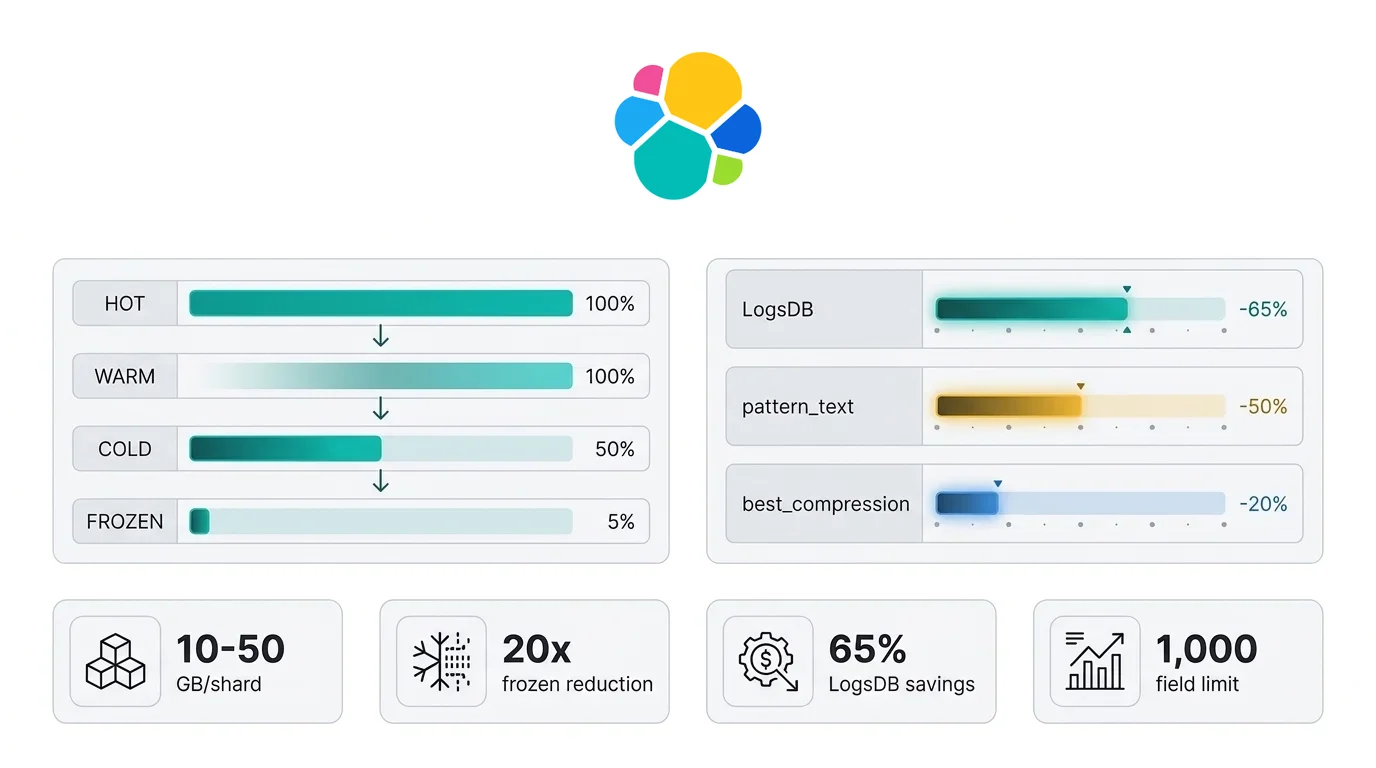
The frozen tier is the largest single storage optimization available without deleting data. Cold tier indices use fully mounted searchable snapshots — no replicas are needed because the snapshot itself provides durability — which cuts storage roughly in half compared to warm indices with one replica (Elastic data tiers docs). Frozen tier indices use partially mounted snapshots, where only a small local cache is maintained on the node. A 10 TB warm-tier index costs approximately 500 GB on frozen.
The 20x reduction figure comes directly from the architecture: a partially mounted index stores only the cached footprint locally and fetches the rest from the snapshot repository on demand. Search latency is higher on frozen — typically 100–500 ms for a cache miss versus single-digit milliseconds on warm — so frozen is appropriate only for compliance queries and historical analytics, not operational dashboards.
| Tier | Storage Footprint | Hardware | Use Case |
|---|---|---|---|
| Hot | 100% (with replicas) | SSD, high IOPS | Active indexing, real-time search |
| Warm | 100% (with replicas) | Standard SSD / HDD | Recent weeks, lower query frequency |
| Cold | ~50% (no replicas, fully mounted snapshot) | Standard storage or object-backed | Monthly/quarterly queries, compliance |
| Frozen | ~5% (partially mounted, local cache only) | Minimal local cache | Annual queries, regulatory retention |
Node role configuration in elasticsearch.yml:
node.roles: ["data_hot", "data_content"]
For a dedicated frozen node:
node.roles: ["data_frozen"]
ILM injects the migrate action automatically into each phase to move shards to the correct tier. Override tier preference explicitly if needed:
PUT my-index/_settings
{
  "index.routing.allocation.include._tier_preference": "data_cold,data_warm"
}
Chart 1: Relative Storage Footprint by Data Tier
Chart 2: Storage Reduction per Optimization Technique
pattern_text: Log Compression for Repetitive Messages
pattern_text is a new Elastic field type, in preview from 9.2 and GA in 9.3, that targets the primary storage problem in log pipelines: repetitive message strings with variable slots. Most application logs follow fixed templates: "Request to [endpoint] failed with status [code] after [duration]ms". The static text is identical across millions of documents. Only the interpolated values differ (Elastic pattern_text reference).
pattern_text decomposes each value into two components. The static template is extracted and stored as a hash in a <field_name>.template_id sub-field. The dynamic variable portions are indexed normally. Because the template text is shared across all matching documents, it compresses with extreme efficiency, especially when the index is sorted by template_id (similar documents are co-located in the same Lucene blocks).
The default analyzer uses delimiter-based tokenization with lowercase normalization, splitting on whitespace plus =, ?, :, [, ], {, }, ", \, and '. This matches the token patterns in most structured and semi-structured logs without requiring a custom analyzer.
The quantified benefit: LogsDB baseline already achieves up to 65% storage reduction vs standard index mode (BusinessWire, Dec 2024). Adding pattern_text on the message field yields a further ~50% reduction on message field storage, with the overall index impact depending on the proportion of message field data vs other fields. For log pipelines where the message field dominates, the combined reduction can exceed 80% vs standard mode.
Here is a pattern_text mapping with LogsDB sort optimization:
PUT _index_template/logs-logsdb-pattern
{
  "index_patterns": ["logs-*"],
  "data_stream": {},
  "template": {
    "settings": {
      "index.mode": "logsdb",
      "index.logsdb.default_sort_on_message_template": true,
      "index.codec": "best_compression"
    },
    "mappings": {
      "properties": {
        "message": {
          "type": "pattern_text"
        },
        "host.name": {
          "type": "keyword"
        }
      }
    }
  }
}
When default_sort_on_message_template: true is set, Elasticsearch sorts the index by host.name, then message.template_id, then @timestamp. This ordering maximises block-level compression by grouping identical message templates from the same host together. For non-LogsDB indices or non-message fields, configure sorting explicitly:
"settings": {
  "index.sort.field": ["notice.template_id", "@timestamp"],
  "index.sort.order": ["asc", "desc"]
}
Two limitations to know before deploying. First, pattern_text does not support multiple values per document. If your field is multi-valued, use match_only_text. Second, span queries are not supported. If you need phrase-proximate search, use interval queries instead — they are more expressive and do not depend on positional index data.
The message.template_id sub-field has direct operational value. Group similar error logs without regex:
GET logs-*/_search
{
  "aggs": {
    "error_patterns": {
      "terms": {
        "field": "message.template_id",
        "size": 20
      }
    }
  }
}
This aggregation surfaces the 20 most frequent message templates in your log stream — effectively automatic log clustering, without any ML.
pattern_text requires an active Elastic subscription. Check your license before deploying to production.
For data stream configuration and LogsDB index mode setup, see Getting Data into Elasticsearch.
Chart 3: Log Index Storage Comparison
Enterprise Use Cases
Financial Services: Compliance Log Retention
Regulatory requirements in financial services typically mandate log retention for 5–7 years. Keeping all of that on warm-tier SSDs is not viable at scale. The correct architecture uses hot/warm for the current 90-day window, cold (fully mounted searchable snapshot) for days 91–365, and frozen for years 2–7. SLM with wait_for_snapshot in the ILM delete phase satisfies the audit requirement that no record is deleted without a confirmed durable backup. Combined with best_compression on the hot phase, this structure keeps total cost per retained GB under $0.01/month at object storage rates.
Kubernetes Observability: LogsDB with pattern_text
Kubernetes event logs are among the highest-repetition log streams in any infrastructure environment. Pod scheduling events, container restarts, and health check failures follow strict template patterns. pattern_text on the message field provides maximum compression benefit on this data. Pair LogsDB index mode with default_sort_on_message_template: true and a data stream per namespace. The result: near-ML-quality log clustering via message.template_id aggregations, with no additional infrastructure. See Elasticsearch at scale for how LogsDB performs at production volume.
Security SIEM: Flattened Mapping for Alert Fields
Security alert schemas are dynamic by design. Different detection rules produce different field sets; SIEM integrations from vendors add arbitrary metadata keys. Using standard dynamic mapping here is a reliable path to mapping explosion within weeks of ingestion. The flattened type contains this problem without losing keyword search on alert fields. Pair with an ILM hot-to-warm-to-delete policy covering a 90-day SIEM retention window. Cross-reference alert patterns against historical data in cold or frozen tier without promoting it back to warm. For thread pool and cluster health signals that indicate a SIEM cluster under write pressure, Elasticsearch Stack Monitoring surfaces the leading indicators.
The storage freed by these optimizations has a secondary benefit for vector workloads. Cluster resources that were allocated to storing redundant inverted indexes and oversized warm-tier shards can be reassigned to HNSW graph memory for Elasticsearch AI Platform use cases.
Frequently Asked Questions
When should I use best_compression vs the default codec?
Use best_compression on any index where read frequency is lower than write frequency — warm, cold, and frozen indices are the obvious candidates. The default LZ4 codec prioritises write throughput. best_compression applies DEFLATE to _source and stored fields, trading a small CPU overhead on reads for 20–30% smaller stored field sizes (Elastic disk usage guide). Hot indices with sustained high ingest rates should stay on the default codec.
Is forcemerge safe to run in production?
Only on read-only indices. Forcemerge to max_num_segments=1 on a write-active index blocks ingestion, saturates I/O, and can produce segments too large for normal background merging (Elastic disk usage guide). The ILM forcemerge action in hot phase triggers after rollover, when the index is no longer receiving writes. In warm phase, the index is already read-only. Never run forcemerge manually on a live write index.
What is the difference between ILM and SLM?
ILM (Index Lifecycle Management) manages index state transitions across hot, warm, cold, frozen, and delete phases based on age, size, and document count (Elastic ILM docs). SLM (Snapshot Lifecycle Management) automates snapshot scheduling and retention — it creates point-in-time backups on a cron schedule and removes old snapshots per retention rules (Elastic SLM docs). They are complementary: ILM controls where data lives; SLM ensures copies exist before deletion.
Does pattern_text work with existing LogsDB deployments?
Yes, but only on new indices or after reindex. You cannot change a field's mapping type on an existing index. Add pattern_text to your index template so it applies to all new indices created by rollover. Existing indices retain their current message mapping. The compression and template_id benefits apply from the first document written to the new index. Requires Elastic 9.2 (preview) or 9.3 (GA) and an active Elastic subscription (Elastic pattern_text reference).
How does the frozen tier handle search latency?
The frozen tier uses partially mounted searchable snapshots. Only a small local cache is maintained on the node; data is fetched from the snapshot repository (S3/GCS/Azure) on cache miss. Search latency for cached data approaches warm-tier speeds. For cache-miss queries, expect 100–500 ms depending on object storage latency and query size (Elastic data tiers docs). Frozen is appropriate for compliance queries and ad-hoc historical analytics, not SLA-bound operational dashboards. Use dedicated frozen nodes to avoid cache eviction pressure from other workloads.
Citation Capsules
Mapping explosion and storage overhead: Elasticsearch maps every string field to both text and keyword by default, creating two inverted index structures per field. The default field limit is 1,000 (index.mapping.total_fields.limit). Exceeding it causes mapper_parsing_exception, JVM heap pressure, and put-mapping task backlogs. The triage setting ignore_dynamic_beyond_limit: true prevents rejection; a reindex with corrected mappings is the permanent fix (Elastic mapping explosion guide).
Data tier storage reduction: Elasticsearch cold tier uses fully mounted searchable snapshots with no replicas, reducing storage by approximately 50% compared to a warm tier with one replica. The frozen tier uses partially mounted snapshots, reducing storage by up to 20x compared to warm. A 10 TB warm-tier dataset requires approximately 500 GB on frozen (Elastic data tiers docs).
LogsDB and pattern_text compression: Elasticsearch LogsDB index mode reduces storage by up to 65% compared to standard index mode. The pattern_text field type (GA in 9.3) decomposes log messages into static templates and dynamic variables, with index sorting by template_id yielding a further ~50% reduction on message field storage. Combined, log pipelines using both features can achieve storage footprints under 20% of standard mode (BusinessWire, Dec 2024, Elastic pattern_text reference).