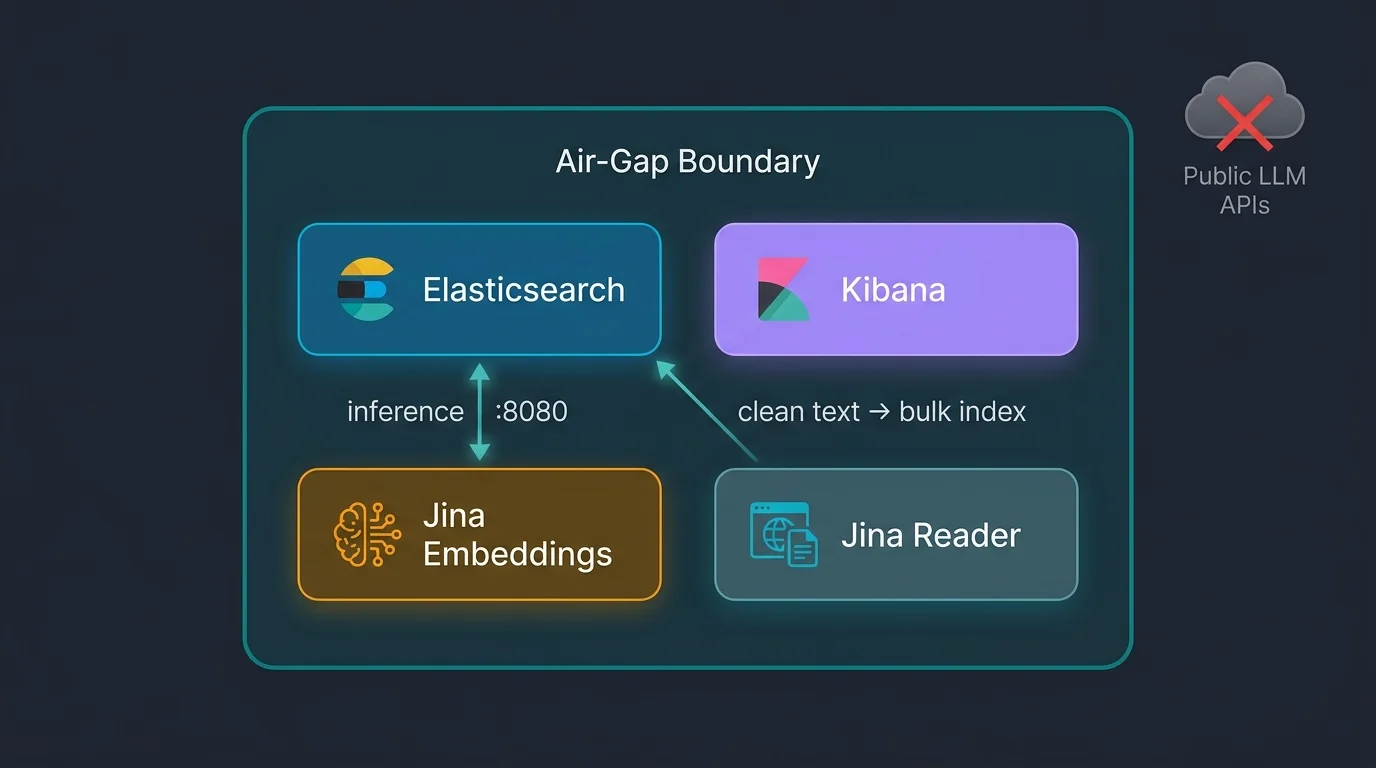
Air-Gapped Semantic Search with Elasticsearch and Jina AI
Air-Gapped Semantic Search with Elasticsearch and Jina AI
Production-grade semantic search with Jina AI embeddings runs entirely inside your network boundary. No outbound inference calls, no per-token cost, no data leaving your perimeter. It targets regulated enterprises and security-conscious teams that cannot route text through third-party AI APIs — whether that is a policy constraint, a compliance requirement, or a data residency obligation.
TL;DR — Key Takeaways
- Elastic acquired Jina AI on October 9, 2025 (BusinessWire) — self-hosted Jina embedding is now a first-class Elastic story, not a workaround.
- The
semantic_textfield handles chunking, embedding at ingest, and embedding at query time — zero pipeline code required.- The
openai-compatible Jina container routes all inference locally; Elasticsearch never calls the internet.- Hybrid RRF retrieval (BM25 + semantic) runs on ES 9.x via the same inference endpoint, with no application-layer changes.
- The stack deploys with a single command; the identical
_inferenceAPI call works on ECK in production without index mapping changes.- Worldwide sovereign cloud IaaS spend hit $80B in 2026, up 35.6% year over year (Gartner, Feb 2026) — the market for this pattern is real and growing fast.
Why Air-Gapped AI Is Now a Board-Level Requirement
Regulated sectors cannot use public LLM inference APIs. This is a hard compliance constraint, not a preference. Worldwide sovereign cloud IaaS spending will reach $80 billion in 2026, a 35.6% year-over-year increase (Gartner, February 2026). That budget signal means compliance teams are moving faster than AI vendors anticipated.
The Compliance Wall Public AI APIs Cannot Cross
PCI-DSS and GLBA treat outbound data transfers to third-party AI APIs as uncontrolled data flows. Both frameworks require documented controls on where cardholder and financial data goes. Sending query strings or document fragments to a shared inference endpoint fails that control requirement on its face.
HIPAA is more specific. Protected health information cannot transit multi-tenant inference endpoints without a signed Business Associate Agreement and enforceable data residency guarantees. Most public AI inference vendors offer neither. The result: patient data and public AI APIs cannot legally share a request path.
UK OFFICIAL-SENSITIVE, US IL5, and NATO CONFIDENTIAL classifications prohibit cross-border inference calls by design. Supply-chain controls on those frameworks extend to the AI model serving layer. An inference API call to a US hyperscaler is a supply-chain exposure under NATO data handling rules. The model host is part of the supply chain — full stop.
NIS2 and NERC CIP cover operational technology networks. Those networks are physically air-gapped. There is no path for an internet-bound API call even if someone wanted to make one. Embedding inference must run on the same isolated network as the OT data. In short: the standard public inference API is not a configuration problem to solve — it is a category of tool that simply does not apply.
For teams building on distributed search infrastructure in these environments, the failure-isolation principles in distributed computing fundamentals apply directly — the air-gap boundary is just another fault domain boundary.
The Sovereign AI Market Signal
By 2030, more than 75% of European and Middle Eastern enterprises will geopatriate — move workloads to region-specific sovereign infrastructure — up from less than 5% in 2025 (Gartner, February 2026). The budget is already moving: $80 billion in sovereign cloud IaaS spend in 2026, up 35.6% year over year. The technology roadmaps are catching up.
That trajectory creates a concrete problem: regulated enterprises need semantic search that runs inside the perimeter. Vector embedding requires a model. Running that model locally used to mean building a custom serving layer. Elasticsearch and Jina remove that build requirement entirely. For context on on-prem and sovereign Elasticsearch deployments, the same cluster architecture applies here — the only difference is where the inference load sits.
What Did Elastic Gain by Acquiring Jina AI?
Elastic acquired Jina AI on October 9, 2025 (BusinessWire, Elastic blog). The models were useful before the acquisition. What changed is they are now part of the Elastic platform — supported, shipped through Elastic's release process, and available via the Elastic Inference Service on Elastic Cloud.
What Elastic Gained
The core asset is open-weight multilingual embedding models. jina-embeddings-v3 has 570 million parameters, covers 89 languages, produces 1024-dimensional vectors by default (reducible via Matryoshka Representation Learning), and handles an 8,192-token context window with task-specific LoRA adapters (arXiv 2409.10173). That combination — multilingual, long context, adapter-tunable — covers most enterprise retrieval use cases without fine-tuning from scratch.
jina-embeddings-v5-text-nano is the CPU-deployable variant. It trades some accuracy for a smaller footprint and faster inference on commodity hardware. It is the default model in the air-gap demo and the right starting point for most on-prem deployments.
Jina Reader is a headless browser extraction layer. It fetches a URL and returns clean Markdown. On-prem, it runs as a container. For regulated environments, you point it at internal URLs (documentation, wikis, intranet pages) and it produces indexable text without a separate scraping pipeline.
Both models ship via the Elastic Inference Service on Elastic Cloud (cloud path) or as the jina-airgap Docker container (air-gap path). The API surface is identical either way.
Cloud vs Air-Gap Deployment Paths
The decision is whether you control the model serving layer. If you are on Elastic Cloud and outbound inference is acceptable, use the native jinaai inference service:
PUT _inference/text_embedding/jina-cloud
{
  "service": "jinaai",
  "service_settings": {
    "model_id": "jina-embeddings-v3",
    "api_key": "<your-jina-api-key>"
  }
}
EIS hosts the model. Zero ops, zero containers to manage. Supported models are listed in the Elastic Inference Service docs. The Elastic Inference Service overview covers the full setup path.
For air-gapped or on-prem deployments, run the jina-airgap container locally and use "service": "openai" in the inference PUT, pointing at http://HOST_IP:8080/v1/embeddings. The semantic_text field works identically in both paths — the application layer sees no difference.
For background on ELSER, inference endpoints, and the broader Elastic AI platform, see Elasticsearch as an AI platform. The Elasticsearch 2025-2026 updates post covers the Jina acquisition announcement and what shipped in the releases that followed.
How Does the Air-Gapped Semantic Search Stack Fit Together?
Four services, one host, zero outbound calls after the initial image pull. Elasticsearch handles indexing, storage, and search. Kibana provides the UI and Playground for RAG queries. The jina-airgap container serves the embedding API with model weights baked into the image. Jina Reader extracts clean Markdown from URLs.
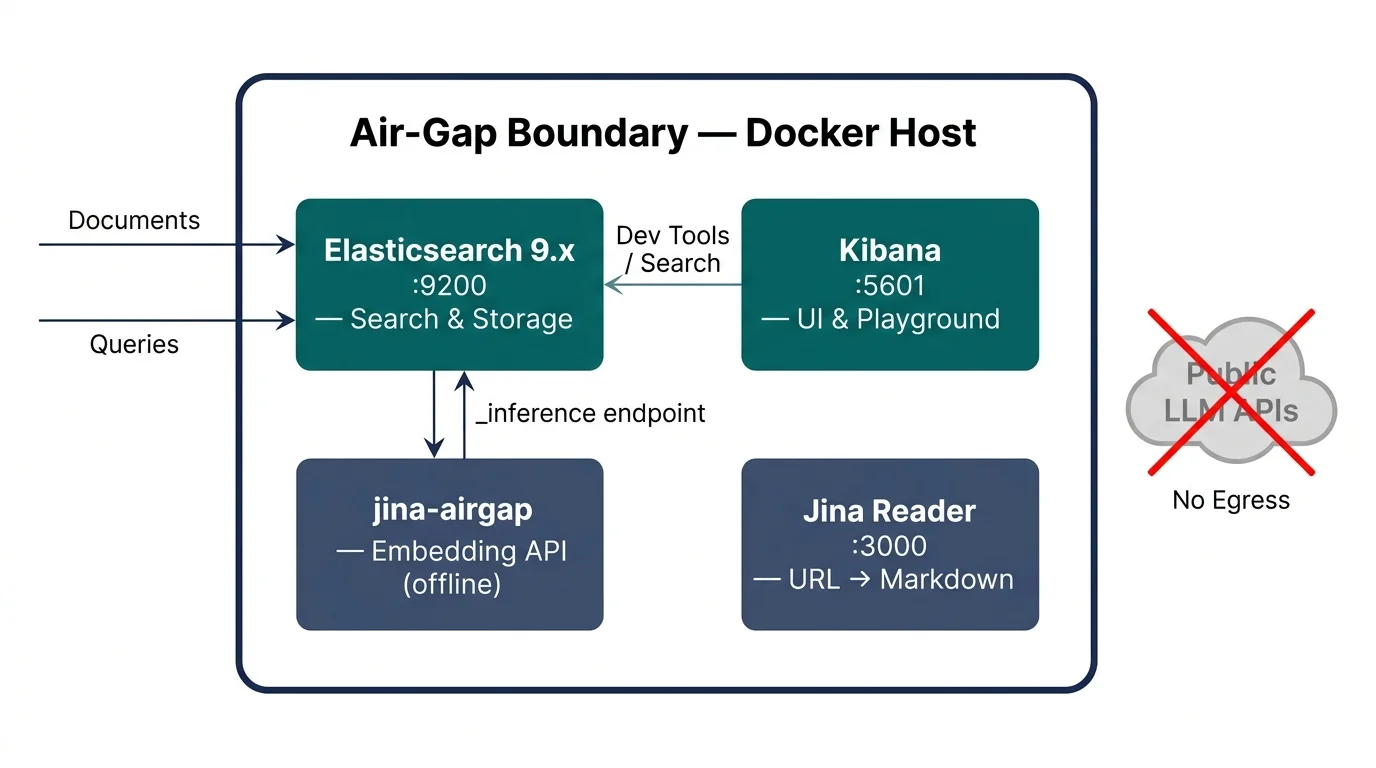
The Integration Seam: _inference and the openai Service
The ES openai inference service accepts any OpenAI-shaped /v1/embeddings endpoint. The Jina airgap container exposes exactly that shape. One PUT call wires the two together. Elasticsearch treats the local Jina server the same way it treats the OpenAI API: it sends text, receives float vectors, and stores them alongside the document.
_inference is Elasticsearch's abstraction layer for model serving. Think of it like a named connection string in a database driver — the application calls the name, not the address, so you can swap the backend without touching index mappings or queries. Swap the URL in service_settings and every index using that endpoint automatically routes to the new backend.
This is the bootstrap call that creates the inference endpoint:
PUT /_inference/text_embedding/jina-local
{
  "service": "openai",
  "service_settings": {
    "api_key": "no-key-required",
    "url": "http://${HOST_IP}:${JINA_PORT}/v1/embeddings",
    "model_id": "${JINA_MODEL}"
  }
}
semantic_text: Zero-Glue Vector Search
Declare a semantic_text field in a mapping, point it at an inference endpoint, and Elasticsearch handles chunking, embedding at ingest, and embedding at query time. No ingest pipeline. No client-side vectorization. No separate embedding step in your application code.
PUT /articles
{
  "mappings": {
    "properties": {
      "title":    { "type": "text" },
      "category": { "type": "keyword" },
      "body":     {
        "type": "semantic_text",
        "inference_id": "jina-local"
      }
    }
  },
  "settings": {
    "number_of_shards": 1,
    "number_of_replicas": 0
  }
}
Index a document and the body field is automatically chunked and embedded before storage. Query with "semantic": { "field": "body", "query": "..." } and ES embeds the query string via the same inference endpoint before running the approximate nearest-neighbor search. The semantic_text field type docs and the semantic search with semantic_text guide cover the full parameter set.
For bulk ingest mechanics — how NDJSON, the Bulk API, and Elastic Agent ingest pipelines interact with indexed fields — see Getting data into Elasticsearch. The same principles apply here; the only new layer is the inference call that fires on each indexed document.
How Do You Deploy It? make run-all End-to-End
One command deploys everything. Expect 5-15 minutes on a fast connection, dominated by image pulls. After that, the stack is running locally with 95 pre-loaded synthetic documents and 6 indexed elastic.co pages ready to query.
Prerequisites
- Docker Engine or Docker Desktop with Compose v2 (
docker compose version, not the legacydocker-compose) curlandjq— standard on macOS, install via package manager on Linux- Approximately 12 GB free disk space: ES around 2 GB, Kibana around 2 GB,
jina-airgaparound 3 GB, Jina Reader around 2 GB - Ports 9200, 5601, 8080, and 3000 free on the host — override any of these in
.envbefore starting - GHCR token is optional but recommended — anonymous pulls from GitHub Container Registry can hit rate limits on first use
Quick Start
git clone https://github.com/adekoyadapo/es-jin-airgaped.git
cd es-jin-airgaped
cp .env.example .env
# Set ELASTIC_PASSWORD and KIBANA_SYSTEM_PASSWORD in .env
make run-all
What Each Step Does
make run-all chains eight steps sequentially. Each step is a separate Make target, so you can re-run any individual step if something fails partway through.
| Step | What it does |
|---|---|
| preflight | Verifies Docker, Compose v2, curl/jq, free disk, and free ports |
| pull | Pulls all four Docker images |
| up | Starts all containers in detached mode |
| wait | Polls ES /_cluster/health and Jina /health until both respond healthy |
| bootstrap | Creates the jina-local inference endpoint, creates articles and webpages indexes, restarts Kibana |
| ingest | Bulk-loads 95 synthetic documents from data/sample.ndjson |
| reader-ingest | Fetches 6 curated elastic.co URLs via Jina Reader and indexes them into webpages |
| verify | Runs 16 automated end-to-end checks across both indexes and the inference endpoint |
Hybrid Search: BM25 + Semantic via RRF
Pure semantic search misses exact-match queries. A user searching for "PCI-DSS article 3.4" expects the document titled exactly that — semantic distance alone may not surface it. Pure BM25 misses paraphrases. A query for "how plants convert light to energy" will not match a document that only mentions "photosynthesis."
ES 9.x retriever.rrf merges both. Reciprocal Rank Fusion (RRF) takes ranked lists from two retrievers and combines them into a single result set without requiring score normalization. Each result's final rank is determined by its position in both lists, not its raw score:
"retriever": {
  "rrf": {
    "retrievers": [
      { "standard": { "query": { "match": { "title": "photosynthesis" } } } },
      { "standard": { "query": { "semantic": { "field": "body", "query": "how plants use sunlight" } } } }
    ],
    "rank_window_size": 50,
    "rank_constant": 60
  }
}
Run make demo QUERY="your question here" for a side-by-side comparison of BM25, semantic, and hybrid results across the loaded sample data. The Hybrid search with semantic_text guide covers RRF parameters and scoring behavior in detail.
How Do You Take Air-Gapped Semantic Search to Production on ECK?
The `PUT _inference/text_embedding/jina-local` call you run against a single-node Docker stack is the identical API call on a 10-node ECK cluster. That portability is deliberate. The inference endpoint is a named reference on the cluster, not a host binding. Swapping from a local Docker deployment to a Kubernetes cluster requires changing exactly one field: the URL in `service_settings`.The _inference API is cluster-agnostic by design. An index mapping that references "inference_id": "jina-local" works on any Elasticsearch cluster that has an inference endpoint named jina-local — regardless of whether that cluster is a Docker Compose stack, an ECK deployment, or Elastic Cloud. The mapping itself does not encode where inference runs.
In production on ECK, deploy the Jina container as a Kubernetes Deployment, expose it as a ClusterIP Service, and update the inference endpoint URL to the Kubernetes Service DNS name:
PUT /_inference/text_embedding/jina-prod
{
  "service": "openai",
  "service_settings": {
    "api_key": "no-key-required",
    "url": "http://jina-service.search-namespace.svc.cluster.local:8080/v1/embeddings",
    "model_id": "jina-embeddings-v5-text-nano"
  }
}
All index mappings, semantic_text field declarations, and search queries carry over without modification. Scale the Jina embedding service independently from the search cluster — add replicas for higher ingest throughput without resizing Elasticsearch nodes. The pattern scales horizontally in both directions. For general guidance on scaling cloud-native infrastructure at this layer, architecting to scale in cloud environments covers the resource and bin-packing trade-offs that apply here.
For teams moving to Elastic Cloud, the cloud path removes the self-managed embedding container entirely. Use "service": "jinaai" in the inference PUT. EIS hosts the model. The application layer is unchanged — same index mappings, same queries, same semantic_text field.
The JinaAI inference endpoint API reference and the Elastic Inference Service overview cover both paths in detail.
What Are the Trade-Offs and Operating Constraints?
This stack makes seven operating choices that constrain how you scale and deploy it. The most significant are the HOST_IP detection behavior, the amd64-only image, and the JVM heap default — each affects developer machines and production hosts in different ways. Know these before committing to a production deployment.
- HOST_IP detection: auto-detected from the default network interface by
scripts/detect_host_ip.sh. Override withHOST_IP=x.x.x.xin.envif auto-detection picks the wrong interface — common on hosts with multiple NICs or VPN adapters active. - amd64-only image: the
jina-airgapimage is built forlinux/amd64. It runs on Apple Silicon under Rosetta 2 but throughput is noticeably lower. Test ingest throughput on Apple Silicon before relying on it for production-scale indexing. Nativearm64images may follow as Elastic integrates the Jina models more deeply. - JVM heap: the demo defaults to 1 GB heap and a 2 GB container memory limit. That is insufficient for production-scale indexing. Set
ES_JAVA_OPTS=-Xms4g -Xmx4gand raisemem_limitindocker-compose.ymlaccordingly. A general rule: heap should not exceed 50% of available RAM, and never exceed 31 GB — see the Elasticsearch JVM settings reference for details. - Jina Reader needs internet access: Reader fetches live pages. For a truly air-gapped deployment, either pre-crawl your content and import it as NDJSON, or omit the Reader container entirely. All embedding inference remains local regardless — only Reader requires outbound connectivity.
- Model swap: change
JINA_MODELin.envand re-run the bootstrap step to update the inference endpoint. No index mapping change is required — but you must reindex all existing documents to regenerate vectors under the new model. Existing vectors are stored under the old model's embedding space; they cannot be reused. - GPU acceleration: set
JINA_TAG=gpuin.envand addruntime: nvidiato the Jina service indocker-compose.yml. Throughput scales with batch size. Useful for high-volume ingest pipelines where CPU inference becomes the bottleneck. - Port conflicts: override
ES_PORT,KIBANA_PORT,JINA_PORT, andREADER_PORTin.envbefore the first run. The preflight check will flag any conflicts but cannot resolve them automatically.
FAQ
Which Jina model should I use?
The default jina-embeddings-v5-text-nano runs on CPU and is the right starting point for most deployments. For multilingual workloads requiring higher accuracy across 89 languages, switch to jina-embeddings-v3 (570M params, 1024-dimensional vectors), documented in arXiv 2409.10173. Set JINA_MODEL in .env and re-run bootstrap.
Can this run on Elastic Kubernetes Operator (ECK)?
Yes. The PUT _inference call is identical on ECK. Replace http://HOST_IP:8080 with the Kubernetes Service DNS name of your Jina deployment. All index mappings, semantic_text fields, and search queries carry over without modification. No application-layer changes required.
How do I update the embedding model without reindexing everything?
You cannot avoid reindexing. Delete the old inference endpoint, create the new one with the updated model, then use the Reindex API to copy documents into a new index — or use an alias swap for zero-downtime cutover. The semantic_text field regenerates vectors at ingest for each new document; existing vectors cannot be reused across models.
Does semantic_text work with the custom inference service?
Yes. Use the custom service if the openai-compatible request/response shape does not fit your embedding server. The custom service supports full header, URL, and body templating. The semantic_text field works with any inference endpoint regardless of service type — the field only sees the inference endpoint ID, not the underlying transport.
Where to Go From Here
This stack is a starting point. It demonstrates that production-grade semantic search inside a network perimeter is achievable without a custom build — four containers, one command, and the same Elasticsearch APIs your team already knows.
The same inference contract that runs on a laptop with make run-all runs on a 10-node ECK cluster with a Kubernetes Service URL swap. That portability is what makes the pattern worth building on. The index mappings, semantic_text field declarations, and hybrid RRF queries are identical whether the stack runs on a developer machine or in a sovereign cloud deployment.
Clone the repo, set your passwords in .env, and run make run-all:
https://github.com/adekoyadapo/es-jin-airgaped
The verify step at the end runs 16 automated checks. If all 16 pass, the stack is working end-to-end. That is a reasonable baseline before adapting it to your own data and deployment target.