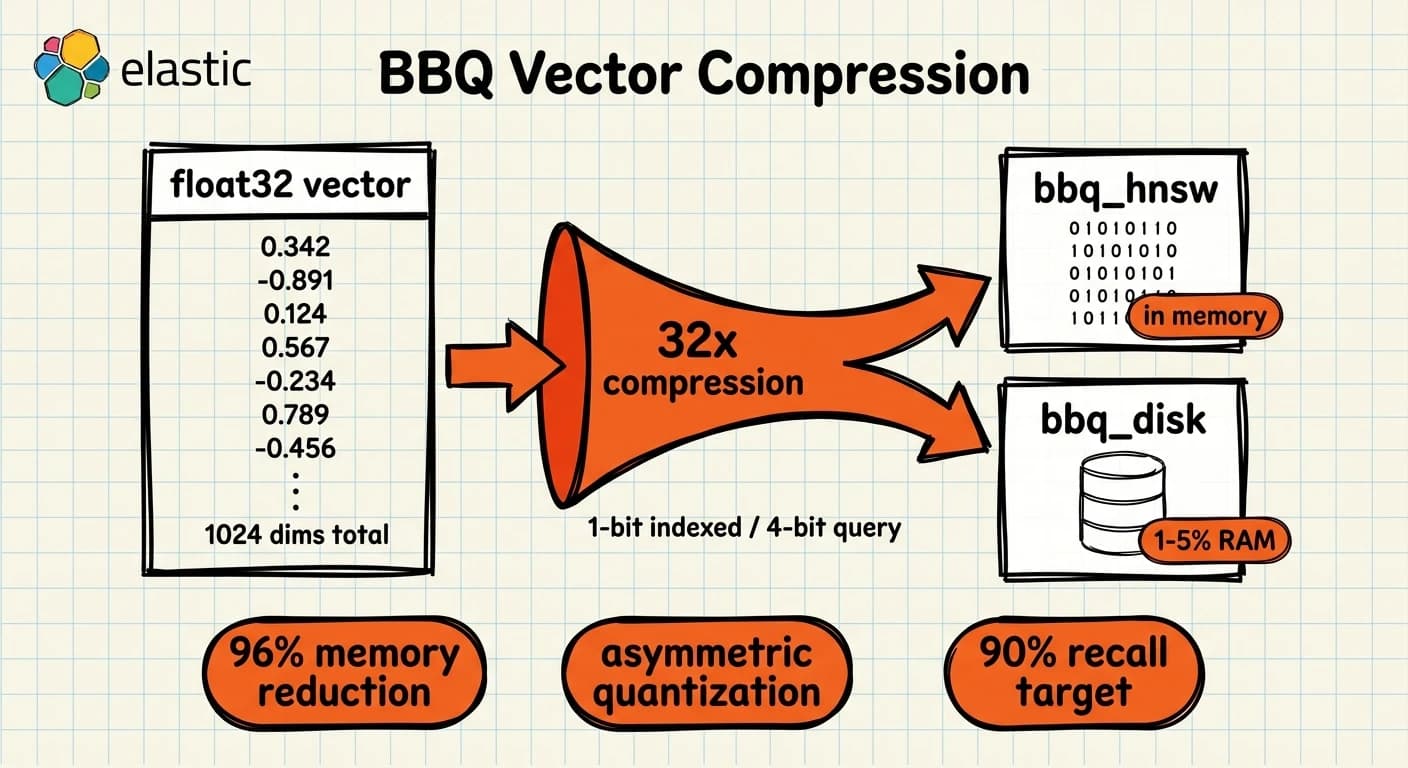
BBQ and DiskBBQ: How Elasticsearch Compresses Vectors Without Sacrificing Search
Running vector search at scale has always had one expensive constraint: memory. HNSW graphs need their full structure in RAM to serve fast queries. At 100M vectors of 1024 dimensions, a float32 index consumes roughly 400GB of heap. That number rules out most production hardware budgets before you even start tuning.
Key Takeaways
- BBQ (Better Binary Quantization) compresses float32 vectors 32x using 1-bit quantization with corrective factors, reducing memory by 96% (Elastic docs).
- DiskBBQ (
bbq_disk) moves the vector index to disk and requires only 1-5% of the index size in RAM — eliminating the HNSW memory ceiling (Elastic docs).- BBQ has been the default for float vectors ≥384 dimensions since Elasticsearch 9.1. DiskBBQ became the default on Enterprise licences from 9.4.
- Elasticsearch 9.5 adds
auto_calibratefor DiskBBQ — per-segment automatic tuning targeting 90% recall at k=10 — and thevectordb_documentindex mode as a dedicated vector database entry point.- Neither BBQ nor DiskBBQ requires a reindex for most tuning changes.
bits,oversample, andauto_calibratecan be changed going forward; onlypreconditionis locked at field creation.
What Problem Does BBQ Solve?
HNSW — the graph algorithm Elasticsearch uses for approximate nearest neighbor search — performs poorly when the full graph does not fit in RAM. A cold read from disk on an HNSW traversal can degrade latency by as much as 5,000x compared to an in-memory search (Elasticsearch 9.2 release notes). That number is not a typo. It is why teams size nodes to fit their vector index entirely in heap, often at significant infrastructure cost.
BBQ addresses the memory side. DiskBBQ addresses the graph side. They solve the problem from different angles and are designed to work together.
How BBQ Works
BBQ compresses each dimension of a float32 vector from 32 bits down to 1 bit — a 32x compression factor. A vector that previously occupied 4KB now occupies 128 bytes plus 14 bytes of corrective metadata.
The mechanism is asymmetric quantization:
- Indexed vectors: 1-bit quantization (each dimension becomes a single bit)
- Query vectors: 4-bit quantization (more precision retained for the query)
Keeping the query at higher precision is the key insight. At query time, the distance between the compressed stored vector and the higher-precision query vector is computed using pre-stored corrective factors. These factors are partial distance calculations stored at index time, and they dramatically close the accuracy gap that naive 1-bit quantization would introduce (Elastic docs).
Because BBQ vectors are much cheaper to compare, HNSW can visit more candidates during graph traversal for the same compute budget. This often produces better ranking than float32 vectors do, not worse — Elasticsearch's default 3x oversampling retrieves 30 candidates for every k=10 request and then re-scores against the full precision query vector.
Memory sizing formula for BBQ:
RAM = num_vectors × (num_dimensions / 8 + 14) bytes
For 10M vectors at 1024 dimensions: 10,000,000 × (1024/8 + 14) = 10,000,000 × 142 = 1.42GB. The float32 equivalent is 10,000,000 × 1024 × 4 = 40GB. That is the 96% reduction in practice.
Caveats that matter:
- BBQ requires
element_type: floatorbfloat16. Byte or bit element types do not support BBQ. - Dimensions must be greater than 64.
- Datasets with fewer than 384 dimensions see less accuracy benefit and higher corrective-factor overhead. Elasticsearch falls back to
int8_hnswbelow this threshold.
PUT /my-vectors
{
  "mappings": {
    "properties": {
      "embedding": {
        "type": "dense_vector",
        "dims": 1024,
        "index": true,
        "similarity": "cosine",
        "index_options": {
          "type": "bbq_hnsw",
          "m": 16,
          "ef_construction": 100,
          "rescore_vector": { "oversample": 3.0 }
        }
      }
    }
  }
}
The Quantization Ladder: int8, int4, and BBQ
Elasticsearch supports three scalar quantization tiers below float32:
| Type | Memory reduction | Disk overhead | Notes |
|---|---|---|---|
int8_hnsw | 75% (4x) | +25% | Default for <384 dims. Safe starting point. |
int4_hnsw | 87% (8x) | +12.5% | Good middle ground. More accuracy loss than int8. |
bbq_hnsw | 96% (32x) | +3.1% | Default for ≥384 dims. Corrective factors recover accuracy. |
bbq_disk | 96% (32x) + disk storage | Minimal on-heap | Enterprise licence. Full index on disk. |
The disk overhead figures are counter-intuitive at first: BBQ stores both the quantized vector and the raw float32 vector (for re-scoring), which adds ~3.1% disk overhead over storing the float32 alone. You trade disk for RAM, not disk for disk.
DiskBBQ: Removing the RAM Ceiling
bbq_disk takes a different architectural approach. Instead of a flat or HNSW graph kept in memory, DiskBBQ groups vectors into clusters using hierarchical K-means. At query time, it finds the centroids closest to the query vector — using only the centroid data loaded in RAM — and then reads the cluster's vectors from disk to compute final distances.
The result: as little as 1-5% of the total index size needs to be in RAM for reasonable performance on a given query workload. An index that would require 40GB of RAM under HNSW can run on a node with 2GB of heap allocated to vector search (Elastic docs).
This changes the economics of Elasticsearch as a vector database entirely. The previous constraint was not compute — it was the need to over-provision RAM to fit the HNSW graph. DiskBBQ moves the bottleneck to disk I/O, which is cheaper and more predictable to scale. NVMe SSDs at 7GB/s sequential read performance handle most production query loads without the memory bill.
PUT /large-vector-index
{
  "mappings": {
    "properties": {
      "embedding": {
        "type": "dense_vector",
        "dims": 1024,
        "element_type": "bfloat16",
        "index": true,
        "similarity": "cosine",
        "index_options": {
          "type": "bbq_disk",
          "cluster_size": 384,
          "bits": 1,
          "rescore_vector": { "oversample": 3.0 },
          "precondition": false
        }
      }
    }
  }
}
DiskBBQ limitations to know:
- Requires an Enterprise licence.
- Recall ceiling is approximately 95%. For workloads requiring 99%+ recall, many clusters must be visited, which degrades latency toward that of a full scan.
on_disk_rescore(preview from 9.3) reads raw vectors directly from disk during the rescore pass, avoiding any in-memory copy. Unavailable on Serverless.
Version History Across 9.x
Understanding what changed in each release matters when you are running a mixed-version environment or planning an upgrade.
9.0 — BBQ goes GA
bbq_hnswandbbq_flatavailable and GA, but not default.- Default for all float vectors:
int8_hnsw. rescore_vectorparameter in preview.
9.1 — BBQ becomes the default
- Default splits by dimension count:
bbq_hnswfor ≥384 dims,int8_hnswfor <384 dims. semantic_textfields adopt BBQ when the inference model is compatible.rescore_vectorreaches GA;oversample: 0supported to disable oversampling entirely.- BBQ joins the updatable type ladder:
bbq_flat→bbq_hnswupgrade without reindexing.
9.2 — DiskBBQ goes GA
bbq_diskGA, Enterprise licence required.- Direct IO added for BBQ rescoring. This specifically addresses the 5,000x latency risk when BBQ vectors do not fit in RAM during a rescore pass.
index.mapping.exclude_source_vectors: truebecomes the default for new indices. Vectors are excluded from_sourcein_search,_get, and_mgetresponses. Saves significant storage and network bandwidth.
9.3 — bfloat16 and on-disk rescoring
bfloat16element type GA. Cuts storage roughly in half versus float32 before quantization, then BBQ compresses further.on_disk_rescore: truepreview forbbq_disk— rescore pass reads raw vectors from disk.- DiskBBQ adds centroid filtering for restrictive filter queries.
- GPU-accelerated HNSW indexing preview.
9.4 — DiskBBQ becomes the default
bbq_diskbecomes the defaultindex_options.typefor float/bfloat16 fields when an Enterprise licence is active.bitsparameter GA: configurable as 1, 2, 4, or 7 bits per dimension. Lower bits = smaller index, lower recall. This can be changed on existing fields (affects new segments only).preconditionGA: random orthogonal projection applied at index time to improve accuracy for vectors with non-normally distributed components. Cannot be changed after field creation.- Native hardware-optimised scoring for BBQ on x86 and ARM SVE.
- GPU indexing GA.
9.5 — Auto-calibration and the vectordb_document mode
Two GA additions specifically for DiskBBQ:
auto_calibrate: true — Elasticsearch determines the best quantization encoding, oversampling depth, and preconditioning per merged segment automatically. The target is 90% recall at k=10. It samples up to 17,000 vectors from each merge producing at least 10,000 vectors. Segments below 10,000 vectors fall back to the configured bits value and default 3x oversampling. Cannot be changed after field creation (Elastic docs).
"index_options": {
  "type": "bbq_disk",
  "auto_calibrate": true
}
vectordb_document index mode — a new index mode that applies a pre-configured, DiskBBQ-optimised set of defaults: element_type is set to bfloat16 (overriding the normal float default), bbq_disk is applied as the index type, and the segment preload extensions (vex, veq, veb, cenivf) are enabled automatically. On Serverless Vector Database projects, this is the only available index mode (Elastic docs).
PUT /vectordb-index
{
  "settings": {
    "index": { "mode": "vectordb_document" }
  },
  "mappings": {
    "properties": {
      "embedding": {
        "type": "dense_vector",
        "dims": 1024,
        "index_options": { "type": "bbq_disk", "auto_calibrate": true }
      }
    }
  }
}
Why This Positions Elasticsearch as a Vector Database
The canonical objection to Elasticsearch as a vector database has been operational: purpose-built systems like Qdrant or Milvus were engineered from the start for disk-based vector storage, while Elasticsearch evolved from a heap-heavy inverted index model. DiskBBQ closes that gap. The 1-5% RAM requirement matches or beats what most purpose-built systems require in practice, and it does so alongside the full Elasticsearch stack — BM25, hybrid retrieval, metadata filtering, aggregations, security, and all the operational tooling that comes with a mature distributed system.
The specific advantage Elasticsearch retains is the hybrid query path. A DiskBBQ vector search can be combined with BM25 via RRF in a single request, with the same rescore_vector pass applied on top. A purpose-built vector database requires a separate system for keyword search and a custom join at the application layer. For the workloads that actually run in production — mixed keyword and semantic queries over the same corpus — that is a meaningful architectural difference.
For implementation patterns across the full search stack, see AI Search: An Elasticsearch Perspective and Elasticsearch at Scale. For a look at the broader AI platform capabilities BBQ enables, see Elasticsearch AI Platform.
Choosing the Right Quantization Type
| Condition | Recommended type |
|---|---|
| Vectors <384 dimensions | int8_hnsw |
| Vectors ≥384 dimensions, standard licence | bbq_hnsw (default from 9.1) |
| Budget under 0.5x float32 RAM, high recall required | int8_hnsw or int4_hnsw |
| Vector index exceeds available RAM, Enterprise licence | bbq_disk |
| DiskBBQ with unknown optimal encoding | bbq_disk + auto_calibrate: true (9.5) |
| Serverless Vector Database project | vectordb_document mode (9.5) |
| 99%+ recall required | float32 HNSW or int8_hnsw — do not use BBQ or DiskBBQ |
FAQ
Do I need to reindex to switch to BBQ?
No, for most changes. The bits value, oversample, and auto_calibrate settings affect new segments only — existing segments retain their current encoding until they are merged. You can update the index_options mapping and Elasticsearch will apply the new settings to future writes. The exception is precondition: this must be set at field creation and cannot be changed.
Is DiskBBQ available on all Elastic Cloud tiers?
DiskBBQ requires an Enterprise subscription on Elastic Stack (self-managed and cloud-hosted). On Serverless, the Vector Database project type uses vectordb_document mode which defaults to DiskBBQ. Check your current tier in the Elastic Cloud console before enabling bbq_disk.
How does exclude_source_vectors affect my queries?
Since 9.2, vectors are excluded from _source by default. If your application reads vectors back from _search results, use docvalue_fields to retrieve them explicitly (GA since 9.4). Direct _source access for vectors is still available by setting index.mapping.exclude_source_vectors: false, but this is not recommended for production — it significantly increases storage and response payload sizes.
When should I use auto_calibrate versus setting bits manually?
Use auto_calibrate: true when you do not have labelled recall benchmarks for your specific dataset and query distribution — it targets 90% recall at k=10 per segment, adapting as your data changes. Set bits manually when you have benchmarked recall requirements (for example, 95% recall at your specific k value) and need deterministic behaviour across segments. Note that auto_calibrate cannot be changed after the field is created, so the choice is permanent per field.
What preload extensions should I set for DiskBBQ?
For bbq_disk fields, add cenivf and clivf to index.store.preload to keep centroid and cluster-list data in the OS page cache. For the vectordb_document index mode (9.5), the preload extensions are configured automatically. Only apply preload to indices where query latency is the primary concern — unnecessary preloading can evict other data from the page cache.
The full configuration reference is at elastic.co/docs — dense_vector and elastic.co/docs — BBQ. The production sizing guide (RAM formulas, DiskBBQ vs HNSW guidance, filesystem preload) is at approximate kNN search.